Have you ever run a print-head cleaning cycle and then noticed that your ink level has dropped?
It can be confusing. You may not have printed many pages, yet the printer seems to have used a surprising amount of ink.
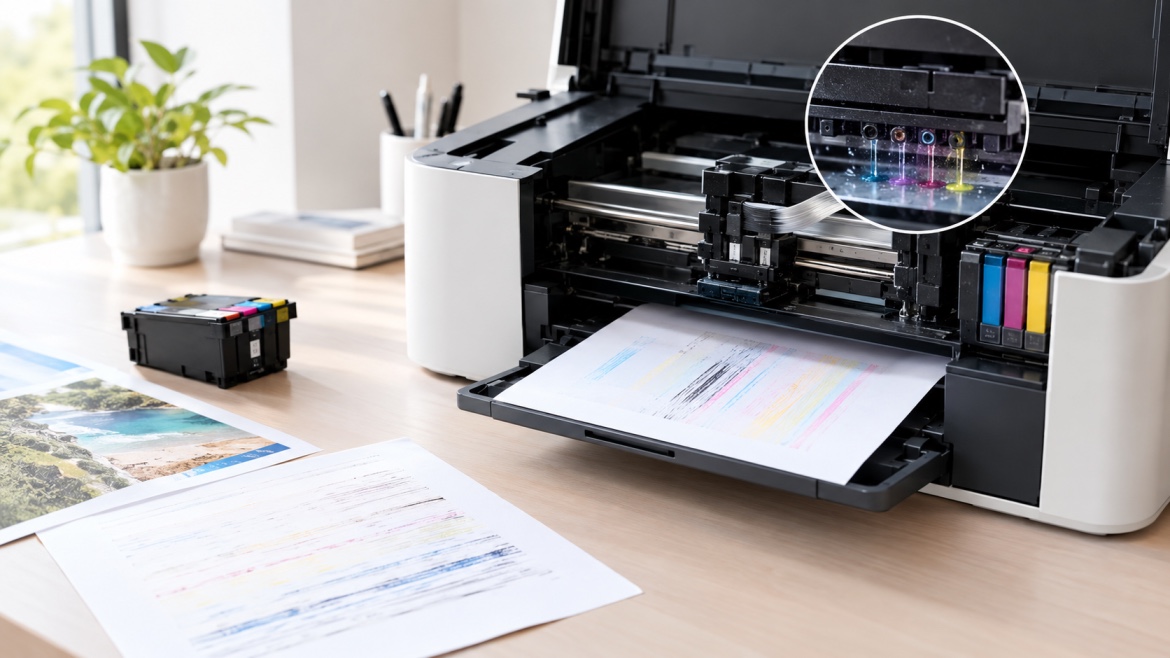
The reason is that printer head cleaning uses ink as part of the maintenance process. Ink is pushed through the print head and tiny nozzles to help remove dried ink or other blockages that may be affecting print quality.
This can be useful when your pages are coming out faded, streaky or incomplete. But if you run cleaning cycles too often, they can also increase your overall ink consumption.
So, how much ink does cleaning really use, and when is it actually necessary?
Why Does Printer Cleaning Use Ink?
Inkjet printers rely on very small nozzles to place ink onto the page.
Over time, those nozzles can become partially blocked, particularly if the printer isn't used regularly. Dried ink can affect the way ink flows through the print head.
You may notice:
- White lines across the page
- Missing sections of text
- Uneven colours
- Faded areas
- Incorrect colours
- Parts of an image not printing
A cleaning cycle is designed to improve ink flow through these nozzles.
To do that, the printer uses some of the ink from the cartridge or tank. That ink is being used for maintenance rather than producing a document.
That's why your ink level can fall even though nothing has been printed.
How Does Printer Head Cleaning Work?
The exact process varies between printer models, but the basic idea is similar.
During a cleaning cycle, the printer moves ink through the print head and nozzles to help clear potential blockages.
Depending on the model, the process may involve:
- Drawing ink from the cartridge or ink tank.
- Moving ink through the print-head system.
- Flushing the nozzles.
- Loosening dried ink or residue.
- Sending excess ink into the printer's waste-ink system.
Some of that ink will never reach the paper.
It's being used to help restore the printer's ink delivery system.
How Much Ink Does a Cleaning Cycle Use?
There isn't a single amount that applies to every printer.
Ink usage depends on the printer model, its ink system and the type of maintenance cycle being performed.
A standard cleaning process may use a relatively small amount. A deeper cleaning or ink-flushing function can use considerably more.
This is why you may notice a bigger drop in the estimated ink level after using an intensive maintenance option.
The important point is that cleaning and printing are two different types of ink usage.
You can use ink without producing a single finished page.
Does Every Cleaning Cycle Use the Same Amount of Ink?
No.
Many inkjet printers have different maintenance options. Depending on the manufacturer, you might see functions such as:
- Print-head cleaning
- Head cleaning
- Deep cleaning
- Power cleaning
- Ink flushing
- System cleaning
These options aren't necessarily interchangeable.
A standard cycle may use less ink than a deep-cleaning function.
For that reason, it's generally sensible to start with the maintenance option recommended for the problem you're experiencing rather than immediately choosing the strongest setting.
Why Does My Printer Need Cleaning?
There are several reasons an inkjet printer may develop print-quality problems.
One of the most common is dried ink around or inside the tiny print-head nozzles.
This can be more noticeable when a printer sits unused for long periods.
For example, if you only use your home printer every few weeks or months, ink may not move through the system as regularly as it does in a busy office.
The environment can also make a difference. Heat, dry air and dust may contribute to printer maintenance problems, although the effect varies between printers and ink systems.
This doesn't mean you need to print unnecessarily just to keep the printer busy.
It simply means that long periods of inactivity can sometimes contribute to problems.
Should You Run a Cleaning Cycle Every Time Print Quality Drops?
Not necessarily.
This is where unnecessary ink usage can start to become a problem.
A poor-quality print doesn't automatically mean the print head is blocked.
Other possible causes include:
- Low ink
- An incorrectly installed cartridge
- Incorrect paper settings
- Unsuitable paper
- Print-head alignment problems
- Printer settings
- A cartridge that isn't seated correctly
- Long periods without use
Before running several cleaning cycles, look at the symptoms and use any diagnostic or print-quality test available on your printer.
That can give you a better idea of what's actually wrong.
Can Repeated Cleaning Waste Ink?
Yes.
One cleaning cycle may be useful if a blocked nozzle is causing the problem.
Running the same process repeatedly without seeing any improvement is a different matter.
Imagine your printer starts producing thin white lines.
You run a cleaning cycle and the result improves slightly.
You run it again.
Then again.
At that point, you've used additional ink, but the underlying problem may still be there.
If several cleaning attempts don't produce a noticeable improvement, it's worth considering another cause instead of continuing to flush ink through the printer.
Can Printer Cleaning Use More Ink Than Normal Printing?
It can.
A maintenance cycle may use ink without producing any usable page.
For someone who prints frequently, this may not be particularly noticeable because the cleaning-related usage is spread across many printed pages.
For an occasional user, however, it can be much more obvious.
For example, if you print only a handful of pages each month but run several cleaning cycles during that period, maintenance could account for a noticeable portion of your ink usage.
This is one reason occasional users sometimes feel that their cartridges are disappearing faster than expected.
Does Leaving a Printer Unused Cause More Cleaning?
It can contribute to maintenance problems, particularly with inkjet printers.
When an inkjet printer sits unused for an extended period, ink around the print head and nozzles can dry.
That doesn't happen to every printer in the same way, and the risk depends on the printer, ink system and storage conditions.
If you rarely print, occasional normal use may help keep the system active.
You don't need to print pages for the sake of using ink. But leaving an inkjet printer completely unused for months may increase the chance of print-quality problems when you eventually need it.
How Can I Reduce Ink Consumption During Cleaning?
You can't avoid using ink when a necessary cleaning cycle requires it.
You can, however, reduce unnecessary usage.
Use cleaning only when there's a reason
Don't make head cleaning part of your routine simply because the printer has the option.
If your pages are printing normally, there may be no reason to run a cleaning cycle.
Start with the standard option
If your printer provides several levels of maintenance, start with the option recommended for the problem.
A deep-cleaning function may consume more ink and shouldn't necessarily be the first choice.
Use a nozzle or print-quality test
Many printers have a test function that can show whether the nozzles are producing ink correctly.
This can help you decide whether cleaning is appropriate.
Give the printer a chance to complete the process
Avoid repeatedly starting new cycles before the previous process has finished.
Once it's complete, print another test page and see whether there has been an improvement.
Look for another cause
If cleaning doesn't resolve the problem, don't assume that another cycle will necessarily work.
The issue could be related to the cartridge, settings, alignment or another part of the printer.
What If Cleaning Doesn't Improve Print Quality?
This is an important point.
If you've followed the printer's recommended maintenance process and the problem remains, continuing to run cleaning cycles may simply use more ink.
Persistent print-quality issues can have several causes, including:
- A heavily blocked print head
- A faulty cartridge
- Incorrect alignment
- Incorrect print settings
- An ink delivery problem
- A mechanical fault
At this stage, it's better to identify the cause rather than repeatedly performing the same maintenance cycle.
Does a New Cartridge Always Fix Poor Printing?
No.
A new cartridge may solve the problem when the existing one is empty, faulty or no longer delivering ink correctly.
But if the problem is caused by the print head, alignment, settings or another component, installing a new cartridge may not change anything.
That's why it's useful to separate cartridge problems from printer maintenance problems.
You can have plenty of ink remaining and still get poor-quality prints.
What Is a Waste-Ink Pad?
Many inkjet printers have an internal system that collects excess ink produced during maintenance operations.
This may be called a waste-ink pad, waste-ink absorber or another name depending on the manufacturer.
When the printer performs a cleaning cycle, not all of the ink goes onto the page. Some is collected by this internal system.
Over a long period of use, the waste-ink system can eventually reach its capacity.
If your printer displays a waste-ink or maintenance warning, follow the manufacturer's instructions rather than continuing to run cleaning cycles.
Does Printer Cleaning Affect Cartridge Life?
Yes, because the maintenance process consumes ink.
That doesn't mean cleaning is something you should avoid.
If a cleaning cycle restores normal printing, the ink used during that process has served a purpose.
The problem is unnecessary maintenance.
A useful way to think about it is:
Use cleaning when the printer needs it — not simply because the option is available.
Common Mistakes That Increase Ink Consumption
A few simple habits can result in more ink usage than necessary.
Running cleaning after every poor print
One poor page doesn't automatically mean the nozzles are blocked.
Starting with deep cleaning
A more intensive cycle can consume more ink, so it isn't always the best place to start.
Repeating cycles without improvement
If several attempts haven't solved the problem, the cause may be something else.
Ignoring diagnostic tests
A nozzle pattern or print-quality test can provide useful information before you use more ink.
Assuming every print problem is caused by dried ink
Cartridge issues, paper settings, alignment and other printer faults can also affect the result.
How Do You Know When Cleaning Is Actually Necessary?
Start with the symptoms.
If your printer suddenly produces missing lines, uneven colours or incomplete text, use the printer's recommended test or diagnostic function if one is available.
If the results suggest a nozzle problem, a standard cleaning cycle may be appropriate.
Once the process is complete, print another test pattern or document.
Has the output improved?
If yes, you may be able to return to normal printing.
If not, avoid repeatedly running the same cleaning process. It's possible that something other than a blocked nozzle is causing the problem.
How Can You Keep Printer Maintenance Under Control?
The goal isn't to eliminate cleaning.
The goal is to avoid unnecessary ink consumption while still keeping the printer in good working order.
A simple approach is:
Poor print quality → Identify the likely cause → Use the appropriate maintenance option → Test the result → Investigate further if there's no improvement
This can save ink and may help you find the actual problem sooner.
The Bottom Line
So, why does printer cleaning use too much ink?
Because the printer uses ink to flush through the print head and nozzles during the maintenance process. Some of that ink is used to maintain the printer rather than print a document.
A cleaning cycle can be helpful when dried ink or blocked nozzles are affecting print quality. But repeatedly running cleaning functions can increase ink consumption without fixing the real problem.
If your ink level seems to drop quickly during maintenance, look at how often you're running cleaning cycles and which type you're using.
Most importantly, don't assume that every print-quality problem needs another cleaning cycle.
Taking a moment to identify the symptoms first can help you avoid wasting ink and point you towards a better solution.