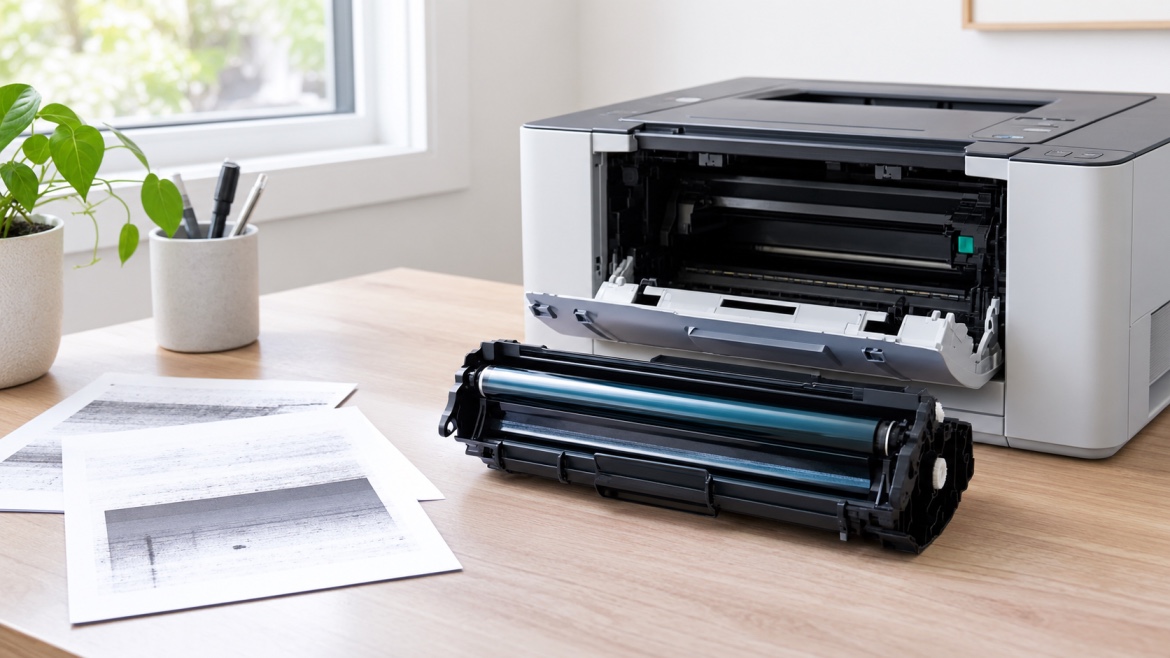
If you have a laser printer, you may eventually see a message about the drum needing attention. You might also notice spots, lines or uneven printing and wonder whether the toner cartridge is the problem.
Often, the answer is not the toner.
The drum is another important part of a laser printer's imaging system, and like other printer consumables, it has a limited working life. Knowing what the drum does, how long it usually lasts and what signs to look for can help you avoid replacing the wrong part.
What Is a Printer Drum?
The printer drum is the component that helps transfer the toner image onto the paper.
Inside a laser printer, the drum receives an electrostatic image. Toner is attracted to the appropriate areas of the drum and is then transferred onto the paper before the image is permanently fixed.
It all happens quickly, so you never see most of the process during normal printing. But the drum plays a major role in producing the text and images on every page.
Depending on the printer, the drum may be:
- Built into the toner cartridge
- A separate drum unit
- Designed to work with a specific toner cartridge
This difference matters when it is time to replace a consumable.
What Does Printer Drum Life Mean?
Printer drum life is the estimated number of pages a drum can produce before it reaches the end of its expected service life.
Manufacturers usually provide a page-life rating for their drum units. For example, a drum might be rated for several thousand pages or considerably more, depending on the printer.
But that number is an estimate, not a countdown that guarantees the drum will fail on a particular page.
Your actual results can vary depending on how you use the printer, the type of documents you print and the conditions around the machine.
How Long Does a Laser Printer Drum Last?
There is no standard lifespan for every laser printer drum.
Some drums are designed for relatively low page volumes, while others are made for busy office printers and can handle much higher workloads.
Things that can affect drum life include:
- How many pages you print
- The type of documents you produce
- How much of each page is covered with toner
- The printer model and drum design
- Paper quality
- The printer's environment
- General printer care
The best starting point is the drum-life specification for your particular printer. It gives you a more useful guide than a general number that applies to every laser printer.
Is the Drum the Same as the Toner Cartridge?
No. Although they work together, the toner cartridge and drum have different jobs.
The toner cartridge supplies the toner used to create the printed image.
The drum unit helps transfer that toner image onto the paper.
Some laser printers combine both parts into one cartridge. Others use separate toner cartridges and drum units.
This is important because a printer can have plenty of toner left while the drum is approaching the end of its life.
What Are the Signs of a Worn Drum?
A printer does not always stop working the moment a drum reaches the end of its rated life. In many cases, print quality starts to change first.
Here are some signs worth paying attention to.
Repeated Spots or Marks
If the same spot or mark appears repeatedly down a page, the drum could be worn or damaged.
A repeating pattern is particularly useful to notice because it can point towards an issue with the imaging components rather than simply low toner.
Lines or Streaks
Unwanted lines or streaks can have several causes, including toner or other printer components. If the problem continues after addressing the cartridge, the drum may need attention.
Uneven Print Quality
Pages may start looking less consistent, with some areas darker or lighter than others.
Grey Backgrounds
A worn or damaged drum can sometimes contribute to unwanted grey areas across printed pages.
A Drum Replacement Message
Many printers monitor drum usage and display a message when the expected drum life has been reached.
The message does not necessarily mean the drum has suddenly stopped working. It usually means the printer has reached the manufacturer's estimated service interval.
Does a Drum Warning Mean It Needs to Be Replaced Immediately?
Not necessarily.
A drum-life warning is generally based on the printer's usage count or estimated service life. It does not always measure the physical condition of the drum at that exact moment.
If your pages still look good, the printer may continue to produce acceptable results after the warning appears.
However, once the expected drum life has been reached, it is sensible to plan for a replacement, particularly if the printer is important to your home or business.
If the warning appears alongside obvious print-quality problems, the case for replacing the drum becomes stronger.
Can a New Toner Fix a Drum Problem?
Sometimes a print-quality issue is caused by the toner, but not always.
If you install a new, correct toner cartridge and the same problem remains, it is worth looking beyond the cartridge.
For example, repeated spots, lines or other consistent defects may indicate that another part of the imaging system needs attention.
This is why replacing toner simply because the pages look poor can sometimes lead to unnecessary spending.
Can You Replace the Drum Without Replacing the Toner?
Yes, if your printer uses a separate drum unit.
The toner and drum have different service lives, so they do not necessarily need to be replaced at the same time.
For example, you may install a new toner cartridge and continue using it while the existing drum reaches the end of its service life.
On printers where the drum is built into the toner cartridge, however, the replacement process is different.
Always follow the consumable system designed for your particular printer.
Can You Extend Printer Drum Life?
A drum is a wear component, so it will eventually need replacing. However, good printer care can help avoid unnecessary problems.
A few simple habits can help:
- Use suitable paper for your printer.
- Keep the printer in a clean, dry area.
- Keep dust and loose paper debris away from the machine.
- Handle drum units carefully.
- Avoid touching the drum surface.
- Use the correct toner and drum for the printer.
- Follow the manufacturer's maintenance instructions.
You do not need to perform complicated maintenance routines to look after a drum. Basic care and using the correct consumables go a long way.
Does Heavy Printing Wear Out a Drum Faster?
Higher print volumes generally mean a drum reaches its rated page count sooner.
However, page count is not the only factor.
The type of documents you print, the amount of toner used and the printer's design can all affect real-world performance.
For this reason, the manufacturer's drum-life figure is best treated as an estimate rather than a promise that every drum will perform exactly the same way.
What Happens If You Keep Using an Old Drum?
A drum that has reached the end of its expected life may still produce pages, but print quality can become less reliable.
You might begin to see:
- Repeating marks
- Lines or streaks
- Uneven areas
- Grey backgrounds
- Faded sections
- Recurring image defects
If these problems become noticeable, continuing to print may not give you the results you need, particularly for invoices, reports or other documents where consistent print quality matters.
Should You Replace a Drum Based Only on Print Quality?
Not always.
Poor print quality can come from several different sources, so it is worth considering the bigger picture before buying a new drum unit.
Look at:
- The printer's current message
- The age and usage of the drum
- The condition of the toner cartridge
- Whether the problem repeats in the same place
- Paper quality and condition
- Recent changes in print quality
- Whether the correct consumables are installed
This can help narrow down the likely cause instead of replacing parts one at a time.
What About Compatible Drum Units?
Depending on the printer model, compatible drum units may be available as an alternative to a manufacturer's original unit.
If you choose a compatible option, make sure it is specifically designed for your printer and matches the required drum reference.
Compatibility is important because the drum needs to work correctly with the printer's imaging system and toner cartridge.
Buying by printer brand alone is not enough. The exact printer model and consumable reference are much more useful when identifying the right replacement.
Common Mistakes When Replacing a Printer Drum
Replacing Toner Every Time Print Quality Drops
Poor printing does not automatically mean the toner is empty. The drum and other printer components can also affect output.
Ignoring Repeating Defects
If the same mark keeps appearing at regular intervals, it is worth investigating rather than assuming the cartridge is running low.
Buying by Printer Brand Only
A single printer brand can use many different drum units. Always match the consumable to the specific printer.
Touching the Drum Surface
The drum is a sensitive component. Avoid touching its surface when handling or installing the unit.
Replacing the Drum Without Identifying the Cause
Before spending money on a new drum, consider whether the problem could be related to toner, paper, installation or another part of the printer.
How Do You Know When a Drum Really Needs Replacing?
A simple way to approach it is to look at three things.
1. The printer message
Has the machine reached its stated drum life or displayed a drum replacement message?
2. The print quality
Are you seeing repeated marks, streaks, grey areas or other problems that were not there before?
3. The rest of the printing system
Have you ruled out an incorrect cartridge, paper problem, installation issue or another maintenance concern?
When the drum-life warning and print-quality problems appear together, it is a good indication that the drum may be ready for replacement.
The Bottom Line
Printer drum life refers to the expected working life of the drum used in a laser printer. The actual lifespan varies between printer models and depends on factors such as print volume, document type, toner coverage and general use.
A drum does not always fail suddenly. You may first notice repeating marks, streaks, uneven printing or a message indicating that the expected drum life has been reached.
The most important thing is to understand the difference between the toner cartridge and the drum unit. If replacing the toner does not resolve a recurring print-quality problem, the drum may be the part that needs attention.
Knowing what to look for can help you replace the right printer consumable at the right time, rather than spending money on parts you do not need.